Copy Any Text From Anywhere Instantly
Stop retyping text from blocked apps and images. Extract, translate, and share text from any screen in seconds – even when copying is restricted.
Everything You Need to Work Faster
Break Through Copy Restrictions
Grab text from Instagram, Facebook, LinkedIn, or any app that blocks copying. Our smart technology bypasses digital restrictions so you can extract any on-screen text with a single tap.
One-Tap Floating Button Access
No need to switch apps or interrupt your workflow. The floating overlay button stays visible on your screen, giving you instant text extraction power whenever you need it.
Instant Multi-Language Translation
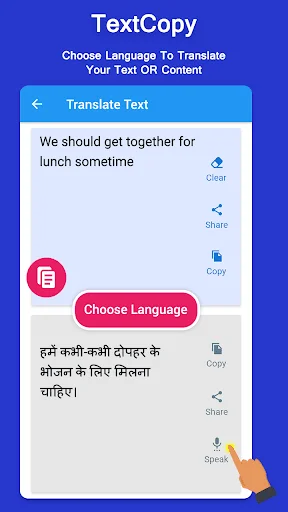
Extract and translate text in one smooth action. Support for English, Hindi, Gujarati, and more lets you understand foreign content immediately without using separate translation apps.
Extract Text From Images
Point your camera at books, signs, or documents to capture text instantly. Our OCR technology turns any photo or screenshot into editable, shareable text you can use right away.
Text Copy On Screen App - Unlock Universal Extraction!
Imagine browsing an image or a social media post and needing to grab data, only for your phone's native long-press option to fail completely. It is incredibly convenient how a compact application can override these digital restrictions and capture stubborn text without you manually typing it out. Text Copy On Screen App is built for those busy moments when you want to save or translate on-screen information but the platform blocks copying. It turns restricted pixels into editable text in seconds.
Screen Extraction Features
- Text Copy On Screen App for harvesting text anywhere on your device
- Copy Text On Screen Tool for bypassing standard app limitations
- Any Copy: Screen Text Transfer for seamless cross-platform sharing
- Universal Copy Paste Any Text for clear multi-application formatting
- TextCopy Software: Copying App for growing your productivity options
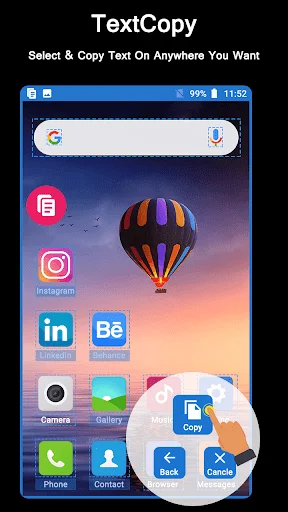
- Floating Overlay Button for instant, one-click access over any interface
- Integrated Translator supporting major scripts like English, Hindi, and Gujarati
- Image & Camera OCR to capture text from pictures, books, and dictionaries
- Notification Bar Control for testing your workspace efficiency
How to best enjoy your Copy Text On Screen Tool!
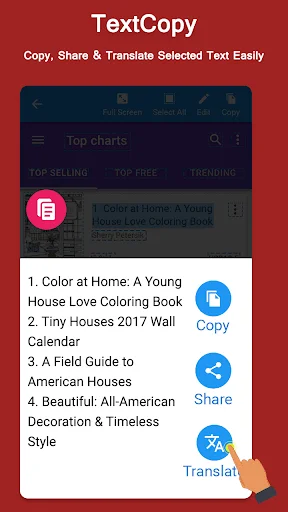
Workflows move rapidly, and manually re-typing text from Instagram, Facebook, or LinkedIn is an absolute waste of time. Using the Copy Text On Screen Tool is the easiest path to keeping your daily productivity seamless. The TextCopy Software: Copying App architecture is entirely streamlined, using standard accessibility frameworks to read screen elements and instantly extract text headers or paragraphs with a single click.
Straightforward Setup and Execution
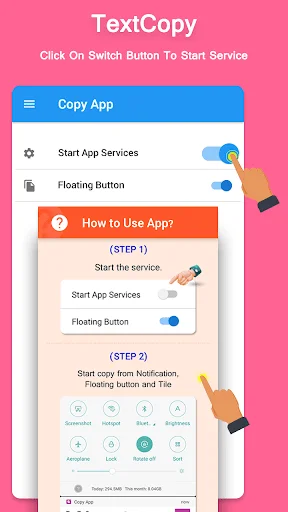
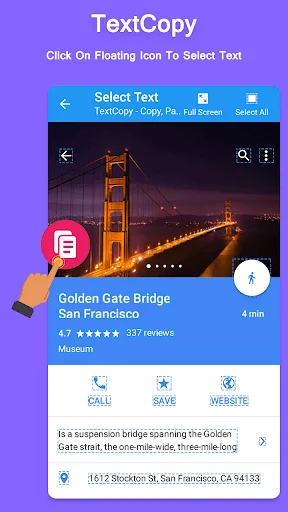
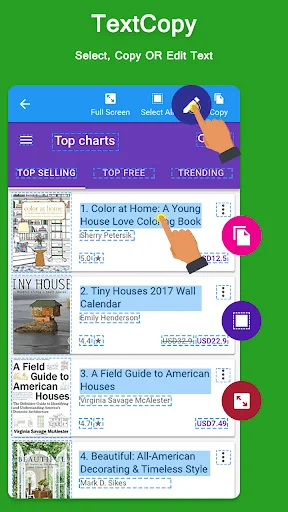
To activate the Any Copy: Screen Text Transfer system, simply enable the main copy service toggle and grant the required accessibility permission so the software can analyze your screen. Once you turn on the floating button, a small overlay icon appears over your active interface. When you encounter a blocked page or restrictive app layout, tapping this icon initializes full-screen mode, making even hidden headers completely selectable. Press the edit button to adjust, copy, paste, share, or translate your text.
Multi-Language Translation Mastery
The Any Copy: Screen Text Transfer feature introduces exceptional flexibility to your communication habits. Once text is isolated from an image, camera feed, or browser, the translation layer can instantly convert it, cleanly translating between scripts like English, Gujarati, and Hindi.
Universal Formatting and Control
The Universal Copy Paste Any Text workflow consolidates extraction and sharing into a single automated motion. Paste your captured text directly into an SMS, email, or any messaging platform. When you are finished with your task, you can cleanly stop the Universal Copy Paste Any Text app from your notification bar or simply drag the floating icon to the bottom of your screen to disable it.
Start Enjoying TextCopy Software: Copying App Today!
Extracting text should be instant and completely unrestricted. Trust the technology and experience how effortlessly it handles your daily research and text-sharing needs. Go ahead and install the software now.
Permission & Services
- uses-permission android:name="android.permission.INTERNET
- uses-permission android:name="android.permission.ACCESS_NETWORK_STATE
- uses-permission android:name="android.permission.ACCESS_WIFI_STATE
- uses-permission android:name="android.permission.SYSTEM_ALERT_WINDOW
- uses-permission android:name="android.permission.BIND_ACCESSIBILITY_SERVICE
- uses-permission android:name="android.permission.FOREGROUND_SERVICE
See How Easy Text Extraction Can Be
Join Over 1 Million Happy Users
i loved this app, why did i discovered this so late🙃 i am using instagram and twitter on browser because i can not select texts in the app's. its very useful when you are taking notes, i am using it with evernote. it is very helpful when you are learning languages. you can select and translate the word. I hope there will be a paid version of it, there should be an ad-free option.
It can copy texts from apps where you don't have the option to copy texts. It copies the whole page in one click rather than you capturing one screen shot after another and then using OCR to copy the whole page. It works in apps where extended screen shot doesn't work. The only downside is the ads. They should have kept the option of a paid version.
It's really interesting and amazing app i ever seen in my life!!! Just no words for it...It's features, the way it's work each and every thing is soo well and developed. I don't have words to describe!! Fantastic. I was looking like this app and finally i found it!! Keep it up!!
KUDOS to the developer for this spectacular app. I hd been searching Copy And Paste app for months and failed to find but finally i got this intriguing Copy And Paste app with translation feature. Such an amazing app.
So this is the best thing that's happened to android since sliced bread. Does exactly what it's supposed to. No ads interrupting my work.. Easy on my battery. Never crashes. Nicely done, developers.
Perfect for my use. I use it to copy text from a book app. For others depending on their use case, it may not work as well. I also find it much easier to use than all other ocr/copy apps I've used.